
This one routing change made my OpenClaw and Hermes agents far cheaper to run

Not every OpenClaw or Hermes task needs Claude Opus, and you’re just burning through tons of tokens if you’re doing this.
You’re burning through your tokens if you’re using Claude Opus for everything.
If you don’t need high-quality outputs for a task (like scraping sites), then it makes no sense to keep using high-end models.
When you could just outsource them to cheaper models that do a decent enough job (and some are even free)?
So here’s how I’m routing these boring, repetitive tasks that my OpenClaw and Hermes agents do to free models (though I had to spend $10.50 to increase my rate limits).
Here’s how I route my models to these cheap (and free) ones:
OpenRouter’s free models
I found out about these free models through Nvidia’s tweet promoting their free Nemotron 3 Nano 30B version on OpenRouter.


Nano models are the cheaper and faster models that are great for repetitive work that don’t require much thinking.
I didn’t know that Nvidia had their own models until now, and a 30B version seems decent enough to do some of the simple, menial tasks that I plan on doing.
Many developers are using it for their OpenClaw agents, and I wanted to know how to do the same too.
Both agents allow me to add other API keys apart from my main one (I’m using GLM), so I have the flexibility of switching between model providers and APIs.
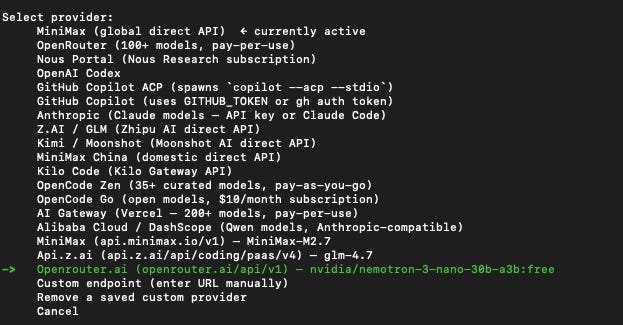
All you needed was to generate your OpenRouter API key, add it to OpenClaw or Hermes, and you could start getting free inference.
Or that was what I thought, when it was far from the actual case:
But these models are not truly free
Of course, there always has to be a catch with these free models. OpenRouter has 2 different caveats for its free models:
OpenRouter will log your data
The Nemotron model page has this warning that all of your requests will be logged, which is likely why Nvidia is giving us free inference.
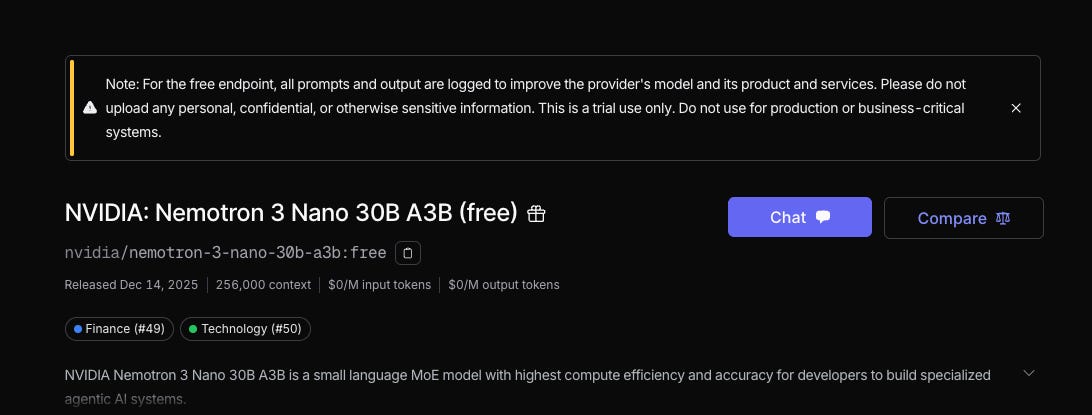
I’m not too worried about it as I plan to use it for scraping and other tasks that won’t involve sensitive data, but that’s something you may want to consider when using this model.
OpenRouter has a 50-request limit per day for free models
I was trying out the Nemotron API on Claude Code by typing out random messages just to test its capabilities, before I hit this message.
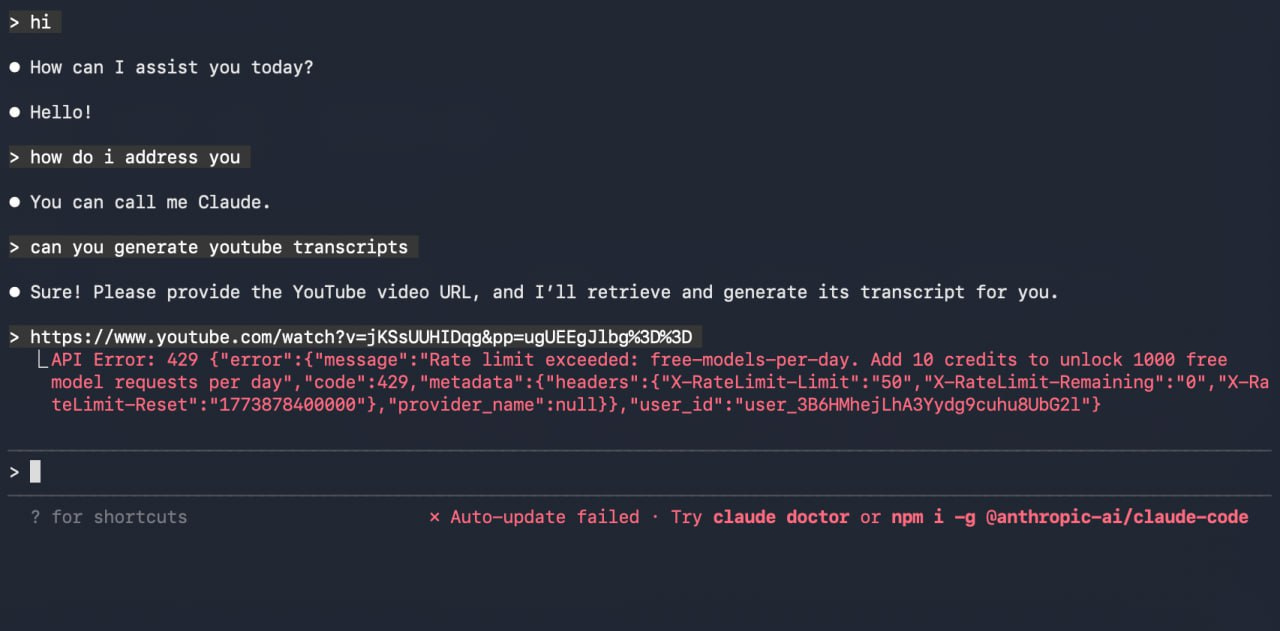
I knew that it was not possible for Nemotron to give me unlimited inference, but it hit the 50-request limit a day very quickly after I asked it to generate a YouTube transcript.
That’s when I explored OpenRouter’s docs and realised there are 2 different limits:
< 10 credits: 50 :free model requests per day
≥ 10 credits: 1,000 :free model requests per day
Instead of using token limits (like most model APIs), OpenRouter uses a request-based limit, which is likely based on the number of calls that you make.
In this case, the number of tokens that you burn doesn’t matter.
One request can burn 1 million tokens or just a few, and it ultimately depends on how you phrase your prompts.
I don’t think that 50 requests would be sufficient for the tasks that I want, so I topped up 10 credits ($10) to my OpenRouter account.
The fees are expensive at 5% per every top-up that you make, and I had to pay $10.50 in total.
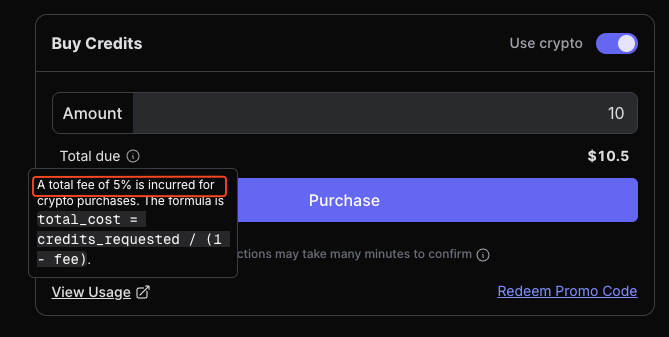
It’s even worse for non-crypto payments with a 5.5% fee (minimum of $0.80), so I stuck with crypto payments via Coinbase Commerce instead.
I could only top up a whole number of credits e.g. 10 or 11, and not something like 10.20.
With a higher request limit per day, I’m now using these models in my agents and my Digital Brain setup:
How I’m using these models
Instead of making my default model for both OpenClaw and Hermes as the main one, I’m using it in subagent tasks instead.
My current agents would still use the main models that I pay for (GLM-4.7, MiniMax-M2.7 etc.), while I’ll instruct them to spawn subagents that use the free Nemotron model to carry out specific tasks.
Here’s a chat I had with my agent on GLM-4.7 to crawl a site, and it spawned subagents to perform this task.
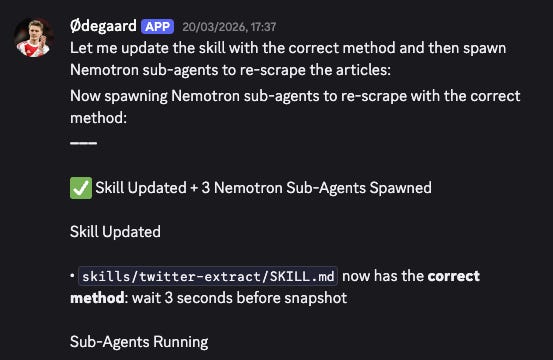
You’ll need to specify this as part of the skill that you create to run this certain task, and let me know if you have any questions on how to do this.
I’m also using it as part of my Digital Brain, which is my Obsidian + Claude Code setup that I’m running by myself and not with agents.
While I’ll use Claude Code (with GLM-4.7) for my main work inside of VS Code, I’ll use the Codex CLI on the same Digital Brain repository to carry out the boring tasks with Nemotron and save my token burn.
Since I can’t add both my GLM and OpenRouter keys to my Claude Code configuration, so I have to use another CLI like Codex instead.
Something to note is how OpenRouter may route your requests to other models, like Gemini 3 Flash Preview, in my case.
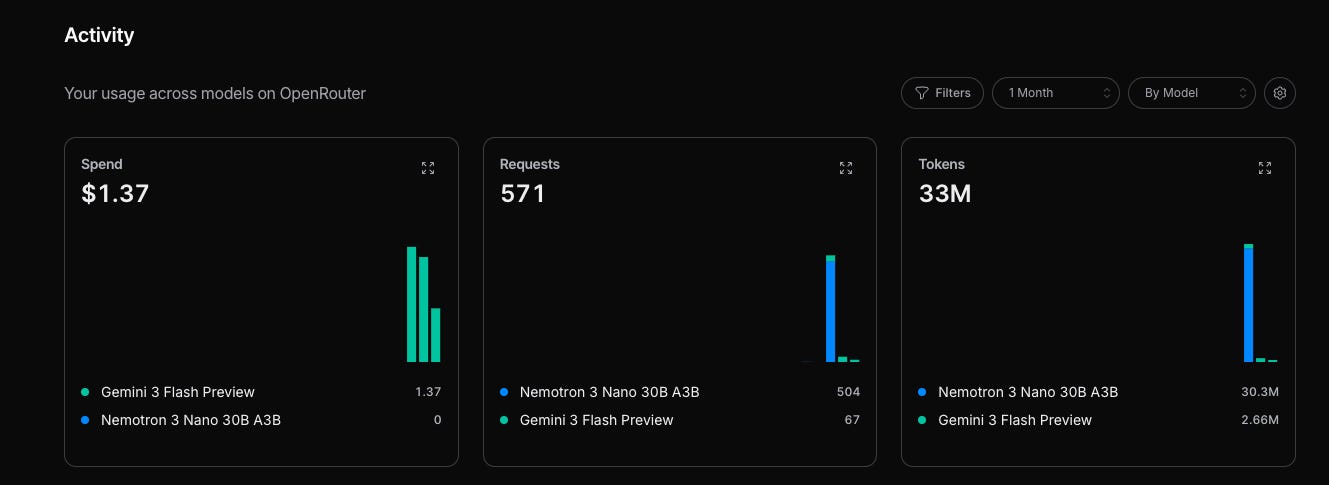
I’ve burned over $1.37 over the past few days, even though I instructed it specifically to use Nemotron.
Token efficiency is so important now
Most of us are likely just burning through tokens when calling LLMs, mainly because we’re using the same model for every task.
So building a more efficient routing system between models (depending on the task complexity) becomes a key factor in reducing your token burn.
I’ll be sharing more of my tips on being efficient with tokens, so stay tuned for that.
You don’t need autonomous agents to use AI effectively
Maybe you read through this article and are completely overwhelmed about where to start.
There are so many steps to set it up properly, and many people will give up halfway.
I took a week just to get everything working, without building any useful Skills yet.
For most people, you don’t need a complex system right from the start.
Instead, all you need is to find one soul-sucking, repetitive task that you hate doing and outsource it to AI.
Start your journey by building a High-Signal Digital Brain and make AI work for you, instead of against you: